Source review: 7 October 2026 · Global. Official references are linked under Sources. Service and event information is a dated snapshot; check the notice for subsequent changes.
The current AION 2 Global code is TAKEFLIGHTAION2. It gives you Odyle Energy (Bound) ×4, Resurrection Spiritstone (Bound) ×5, and Battle Enhance Scroll (Bound) ×10. Redeem it in the game through Settings > Miscellaneous > Account > Enter Coupon before October 13, 2026 at 11:00 PM PDT, which is October 14 at 2:00 AM EDT.
The coupon can be claimed only once per account, and the rewards are delivered to the Cube inventory of the character used for redemption. Choose that character deliberately and leave enough free Cube space before confirming the code.
After redeeming, check how the Energy item is used. Twitch Drops are a separate campaign. A login failure belongs to server status checks.
Active AION 2 codes for October 2026
| Code | Rewards | Expiration |
|---|---|---|
TAKEFLIGHTAION2 | Odyle Energy (Bound) ×4; Resurrection Spiritstone (Bound) ×5; Battle Enhance Scroll (Bound) ×10 | October 13, 2026 at 11:00 PM PDT / October 14 at 2:00 AM EDT |
TAKEFLIGHTAION2 is the Global launch coupon listed for this period. Check the reward preview in the coupon screen before confirming the claim.
This is a time-limited launch coupon. Entering it after the cutoff will not produce the listed rewards, even if the code still appears on an older post, image, or video. Redeeming early also gives you time to correct an inventory-space error before the deadline.
The code applies to the current Global version. Coupons associated with the older Korean or Taiwan releases should not be treated as Global codes unless they are separately announced for Global. The regional versions have different release histories and content states, so a code seen in a Taiwan community discussion is not automatically usable on a Global account.
Important conditions before redeeming the code
Three conditions matter more than the typing step itself: the account, the selected character, and available Cube space.
Choose the receiving character first
Start the game on the server and character that should receive the items. A redeem code can be used only once per account. After you claim it on one character, you cannot claim the same coupon again on another character merely because that character is on a different server or belongs to the other faction.
Use your intended main character if you are uncertain. The important point is not whether one class benefits more from the coupon; it is that the one-account limit makes the initial character choice difficult to undo through another redemption. Do not enter the code while testing an alternate character unless that is genuinely where you want the rewards delivered.
Make room in the Cube
The coupon rewards are deposited directly into the receiving character’s Cube inventory. If the Cube is full and there are no free inventory slots, the game can reject the redemption and instruct you to clear space.
Open the Cube before redeeming and make enough room for the reward delivery. If you already encountered the inventory error, free some slots, return to the same coupon screen, and submit the code again. Do not assume that the items were delivered somewhere else when the game explicitly reports that the Cube is full.
Use the in-game coupon screen
AION 2 does not currently provide a separate official website redemption portal for this coupon. You must be logged into the game and use the account section of the settings menu. Searching the account website for a code box will not complete the claim.
How to redeem AION 2 codes
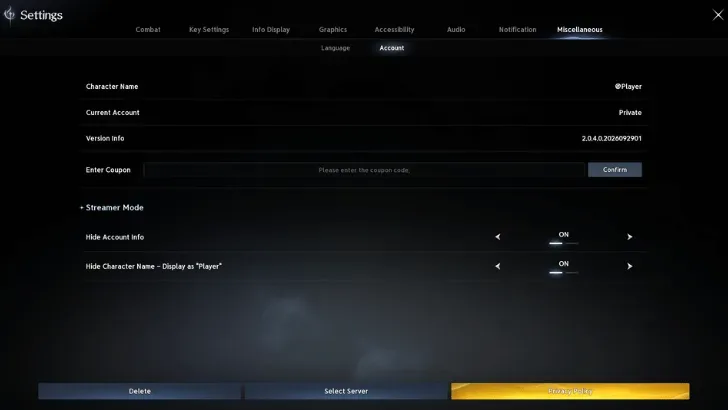
The in-game menu path for entering a coupon code.
- Launch AION 2 and log into the account that will claim the coupon.
- Choose the correct server, then select or create the character that should receive the rewards.
- Enter the game with that character.
- Open the main menu. On PC, you can press Esc; the menu can also be opened from its on-screen control.
- Select the Settings icon in the menu.
- Open the Miscellaneous tab along the top of the settings screen.
- Select the Account sub-tab.
- Find the Enter Coupon text box.
- Enter
TAKEFLIGHTAION2exactly as shown. - Select Confirm.
- Open the receiving character’s Cube and verify that the three reward types were added.
The complete navigation route is:
Main Menu > Settings > Miscellaneous > Account > Enter Coupon > Confirm
If you cannot find the coupon field, verify that you opened the Account sub-tab inside Miscellaneous. The field is not a separate top-level menu option, and it is not located on an external redemption website.
Where the coupon rewards are delivered
Successful redemption places the items directly in the selected character’s Cube inventory. The claim does not require a second website step, a mailbox code, or a separate reward-collection page in the documented Global process.
Check the same character you used when entering the coupon. Looking at another character’s Cube may make a successful claim appear to be missing, especially if you changed servers or characters after redemption. The once-per-account restriction means submitting the coupon again on that second character is not a valid way to move or duplicate the reward.
Verify the delivery against all three entries rather than looking for a single bundle:
- Four Odyle Energy
- Five Resurrection Spiritstones
- Ten Battle Enhance Scrolls
The rewards may appear as separate item stacks in the Cube. Confirm each item name and quantity before concluding that part of the coupon is missing.
What the code rewards contain
The coupon provides consumable resources rather than currency, a permanent skin, or a character unlock. Each reward has a different practical role, so identifying the item names also helps you verify that the claim completed correctly.
Odyle Energy
The code grants four Odyle Energy. Odyle Energy is used when opening reward chests or reward cubes connected with dungeon activities such as Expeditions, Transcendence, and Sanctuary. It affects reward collection rather than serving as the entry requirement described by this coupon guide.
The code page does not establish a universal best dungeon in which to spend these four units. Your progression target and available reward content determine that choice, so keep the coupon claim separate from broader Odyle farming or dungeon-priority decisions.
Resurrection Spiritstone

The code grants five Resurrection Spiritstones. A Resurrection Spiritstone is a consumable used to resurrect a fallen Daeva and can be used in dungeons. Because it is consumed when used, the quantity shown in the Cube should fall as stones are spent.
The important redemption check is the initial stack of five. If you expected five but are examining the inventory after using one, compare the remaining quantity with your recent use before treating the delivery as incomplete.
Battle Enhance Scroll
The code grants ten Battle Enhance Scrolls. A Battle Enhance Scroll temporarily increases damage boost and damage tolerance. The current reward description lists a ten-percent increase to each effect for five minutes.
This scroll is a temporary combat consumable, not a permanent character-stat upgrade. The coupon supplies a stack of ten scrolls, so using one changes the remaining stack rather than permanently attaching the effect to the account.
Account and character restrictions
The one-account limit is the main irreversible part of this redemption process. Treat the coupon as one claim assigned through the character that is active when you redeem it.
Changing faction does not create another eligible claim. Selecting another server does not refresh the coupon. Creating an alternate character also does not bypass the account restriction. If the account has already received the rewards, the code cannot be used again simply to give another character a second set.
This is why the recommended order is character selection first, inventory check second, and code entry third. That order prevents the two most avoidable problems: assigning the items to an unintended character and reaching the confirmation step with a full Cube.
The Global version runs on Windows PC through Steam and PURPLE, with the same content and shared servers. The coupon procedure is an in-game account action, so begin from the Global game client and the account whose character should hold the rewards.
Troubleshooting a code that does not work
Use the symptom shown in the game to choose the next step. Repeatedly pressing Confirm without correcting the relevant condition will not create a second claim or override an expired coupon.
| Symptom | Likely reason | What to do |
|---|---|---|
| The Enter Coupon field is missing | The wrong settings section is open | Open Settings, select Miscellaneous, and then select the Account sub-tab. |
| You cannot find a web redemption page | This coupon is redeemed in the game | Log into AION 2 and use the in-game Enter Coupon field. |
| The game reports that the Cube is full | The receiving character has no free inventory space | Clear Cube slots, return to the coupon field, and try again. |
| The code was already claimed | The account has used its single claim | Check the Cube of the character used for the original redemption. Another character cannot claim a duplicate set. |
| The expected items are not on the current character | A different character may have submitted the coupon | Check the server and character that were active during redemption. |
| The code is rejected near or after the deadline | The coupon may have expired | Compare the current time with the listed PDT or EDT cutoff. An old code listing does not extend its validity. |
| A Taiwan or Korean code does not work on Global | Regional applicability is different or unverified | Use only a code confirmed for the Global version. |
| The reward quantity seems wrong | You may be checking a stack after using items | Compare the coupon reward preview with the inventory delivery and any consumables already used. |
When re-entering the active coupon, use TAKEFLIGHTAION2 without adding spaces, punctuation, or quotation marks. The safest approach is to compare the entire string before confirming rather than relying on memory.
If the Cube was full, the documented recovery path is straightforward: make room and retry through Settings > Miscellaneous > Account. A full-inventory rejection is not evidence that the account permanently lost its claim, provided the code has not expired and the redemption did not complete.
If the account has already claimed the coupon successfully, however, changing characters and retrying is not a recovery step. Return to the original receiving character and inspect that character’s Cube.
Expired and region-specific code limits
The October Global list contains only TAKEFLIGHTAION2. Older community discussions mention other coupons used in the Taiwan version, but their presence in those discussions does not confirm that they work in Global. Listing them beside a verified Global coupon would blur an important regional boundary and could send players through repeated failed attempts.
The same rule applies after the deadline: a code does not remain active because a search result still calls it current. Use the explicit expiration of October 13 at 11:00 PM PDT / October 14 at 2:00 AM EDT as the cutoff for this claim.
After that time, the correct status for TAKEFLIGHTAION2 is expired unless AION 2 announces an extension. Do not expect the in-game menu to award the items from an expired coupon, and do not confuse the availability of the Enter Coupon field with proof that a particular code remains valid.
Quick redemption checklist
Before selecting Confirm, make sure all of the following are true:
- You are logged into the intended Global account.
- You selected the server and character that should receive the items.
- The character’s Cube has free inventory space.
- You opened Settings > Miscellaneous > Account.
- You entered
TAKEFLIGHTAION2exactly. - You are redeeming before the stated expiration time.
After confirmation, check the same character’s Cube for Odyle Energy (Bound) ×4, Resurrection Spiritstone (Bound) ×5, and Battle Enhance Scroll (Bound) ×10. That inventory check is the clearest completion receipt for the current AION 2 code.
Sources and verification
- Official TAKEFLIGHTAION2 coupon notice — Official: coupon rewards, redemption path and deadline.
- AION 2 Global launch FAQ — Official: platforms, shared servers and account boundaries.