Source review: 7 October 2026 · Global. Client-data references below are independent database records, not NC announcements or our own gameplay tests. Routes and spending priorities are editorial suggestions; live unlocks, prices and reward prompts take precedence.
Use the Gamers4Life AION 2 event timer, select your actual server region, and read the countdown together with its timezone label. The independent schedule lists Spacetime Rifts every three hours from 02:00 on the selected server clock. A single UTC timetable should not be applied to every Global region.
The tool was checked during this review: its countdown loaded and its EU region selector changed the selected-region label and schedule. This verifies the web interface, not the next live event inside the game. MetaBot's regional timezone anchors are explicitly assumptions; compare any external timer with the in-game clock and announcement before relying on it.
For the route after crossing, use Spacetime Rift quests and entry checks. If the game is unavailable, check server status before blaming the timer. A short cube route can fit between events.
Open the timer and select the region
- Open the event timer and select NA East, NA West, EU or the region that actually contains your character.
- Check the label under the countdown. The tool converts times to your device timezone, so do not add the timezone offset a second time.
- Choose the Rifts filter to isolate Spacetime Rift from festivals, world bosses and Abyss activities.
- Compare one occurrence with the game clock and announcement. If they disagree, follow the game and report the mismatch to the tool provider.
- Set a personal reminder early enough to log in and travel. Browser alerts are optional and may require notification permission.
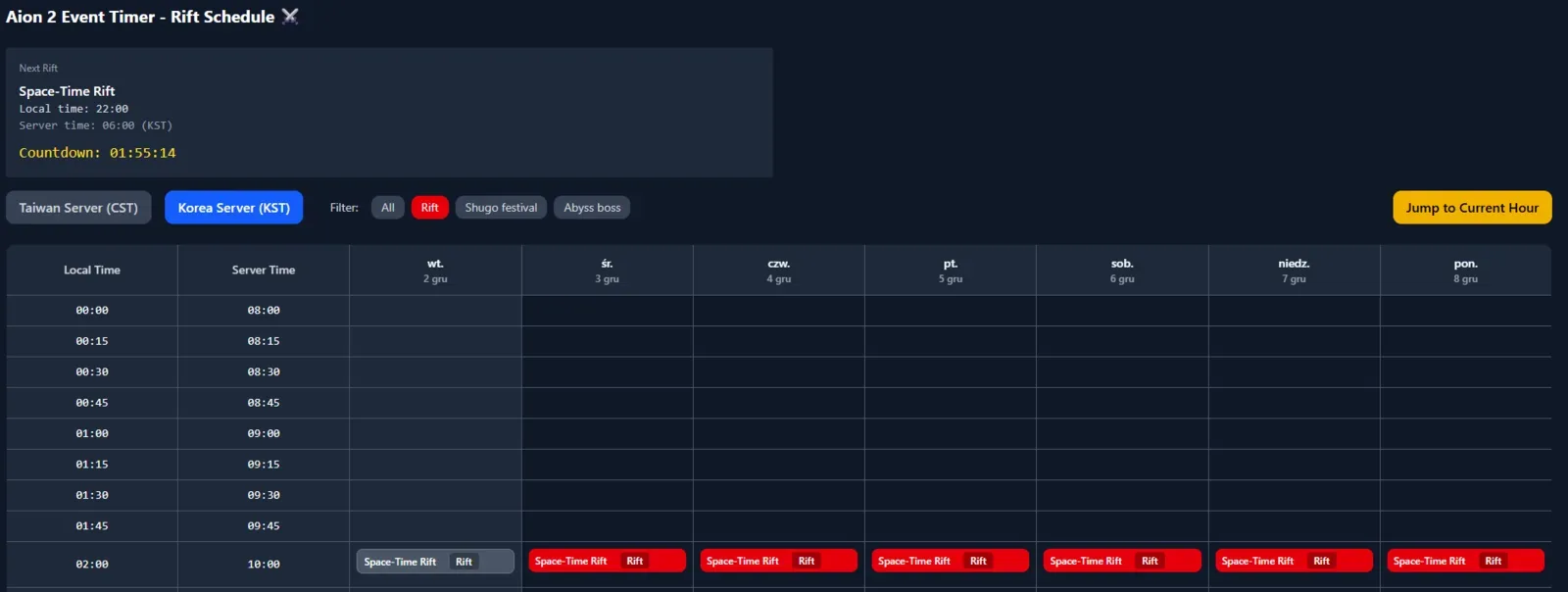
Illustrative screenshot. Its displayed countdown is not live; use the linked tool for the current display.
Read the server-clock schedule correctly
| Server-clock slot | Following slot |
|---|---|
| 02:00 | 05:00 |
| 05:00 | 08:00 |
| 08:00 | 11:00 |
| 11:00 | 14:00 |
| 14:00 | 17:00 |
| 17:00 | 20:00 |
| 20:00 | 23:00 |
| 23:00 | 02:00 the following day |
These are the independent provider's server-clock slots, not universal UTC hours. Server-region selection, daylight saving and device timezone can all affect the local display. A browser countdown can also become stale after sleep, so refresh the page when returning to a suspended tab.
Find the current portal
At the opening, look for the in-game system message and the current vortex marker. Select the marker to read its entry conditions, remaining uses and remaining time. Plan the final travel leg from a friendly teleport point; a timer alone cannot identify the portal that is active on your server.
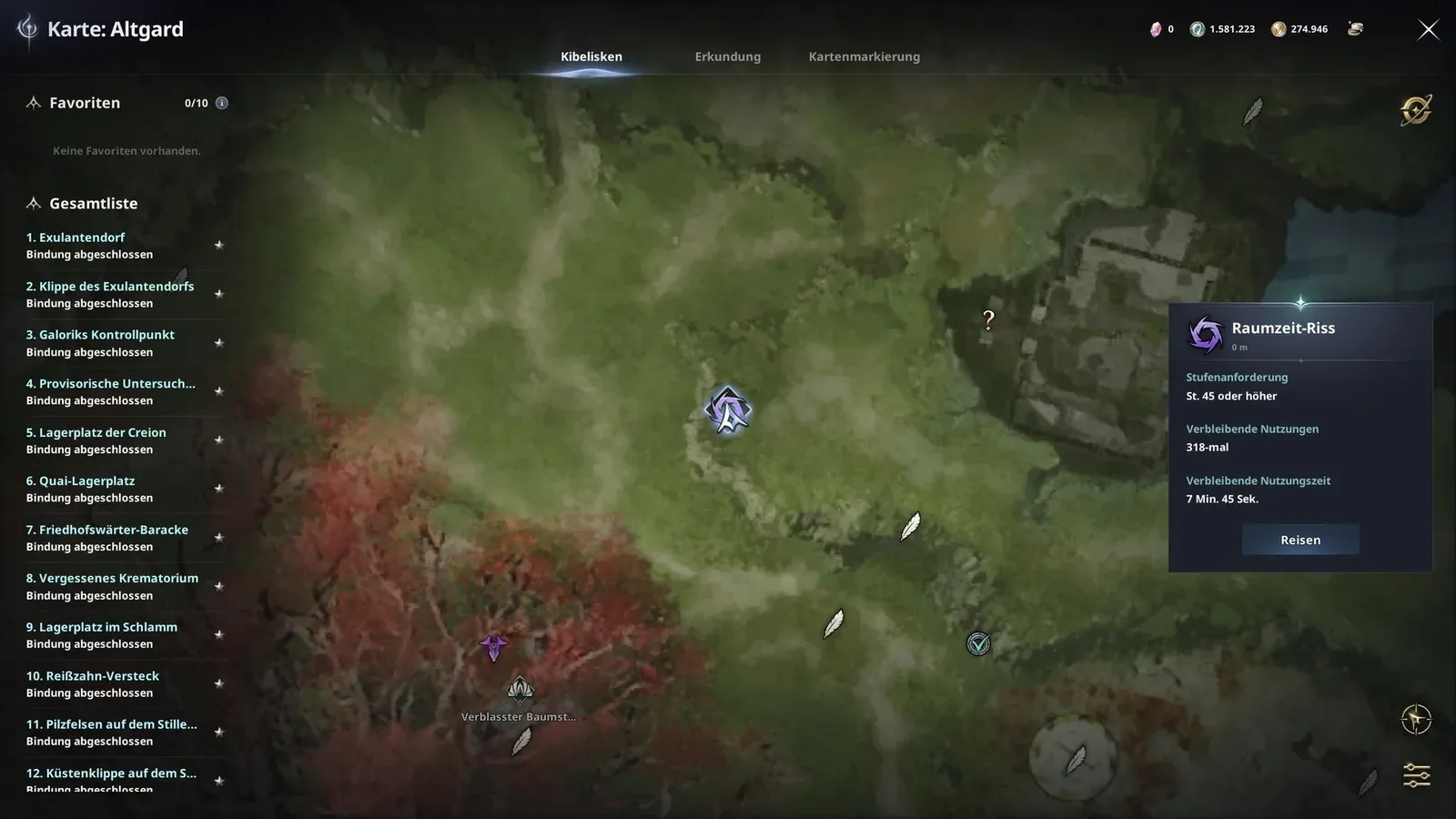
The entry window and the time allowed after crossing are separate fields. This review did not independently confirm a universal ten-minute entrance or one-hour visit for every Global region and difficulty. Read Until the end of Spacetime Rift and Basic Usage Time on the actual panel instead of using a fixed example as a guarantee.
Before crossing, activate the objectives you intend to complete and check their destination. Keep the route compact enough for the time actually granted. Read the event's current death, exit and re-entry rules before deciding whether to continue after a failed attempt.
If the countdown reaches zero but no Rift appears
Check the selected region first, then refresh the timer. Check the game announcement and map rather than waiting at an old marker. If no live portal exists, check current maintenance notices; an external clock cannot establish that the server is available.
If a portal appears but entry fails, read its panel. A level requirement, exhausted entry allowance, closed window or quest prerequisite can explain the failure without any timer defect. Record the exact message before reporting it.
A reminder routine that survives a timezone change
Use the countdown as a preparation aid and the live portal as the final confirmation. After changing region or traveling, check the device timezone and reselect your game region. Verify the next occurrence again before creating repeated alarms. This avoids carrying a correctly calculated reminder into the wrong server region.
Sources and verification
- MetaBot Spacetime Rift schedule and quests — Independent provider: server-clock schedule; regional timezone anchors are assumptions to compare with the game.
- MetaBot database methodology — Independent data provider: reports parsing Global client build 0.0.4387.0. Client records do not prove live activation or server-side behavior.
- AION 2 Global notice board — Official: current maintenance, service and event updates.